Ever found yourself scratching your head, trying to remember how to find epic games id when you needed it most for cross-play, friend requests, or customer support? It is a common query among US gamers, especially those balancing busy lives with their passion for gaming. This comprehensive guide provides clear, step-by-step instructions to locate your Epic Games ID on PC, console, and mobile. We understand that gamers, averaging around 36 years old, appreciate efficiency and direct solutions. Whether you are trying to link accounts, troubleshoot an issue, or simply connect with friends, knowing where your Epic Games ID is crucial. This article delves into various methods, from checking your Epic Games Launcher settings to using the website and even in-game menus for popular titles like Fortnite. Discover how this unique identifier facilitates seamless social gaming experiences and helps you optimize your playtime without unnecessary hassle. Stay current with gaming trends and ensure your setup is always ready for action. Finding your Epic Games ID is easier than you think and vital for a smooth gaming journey.
How to Find Epic Games ID on PC?
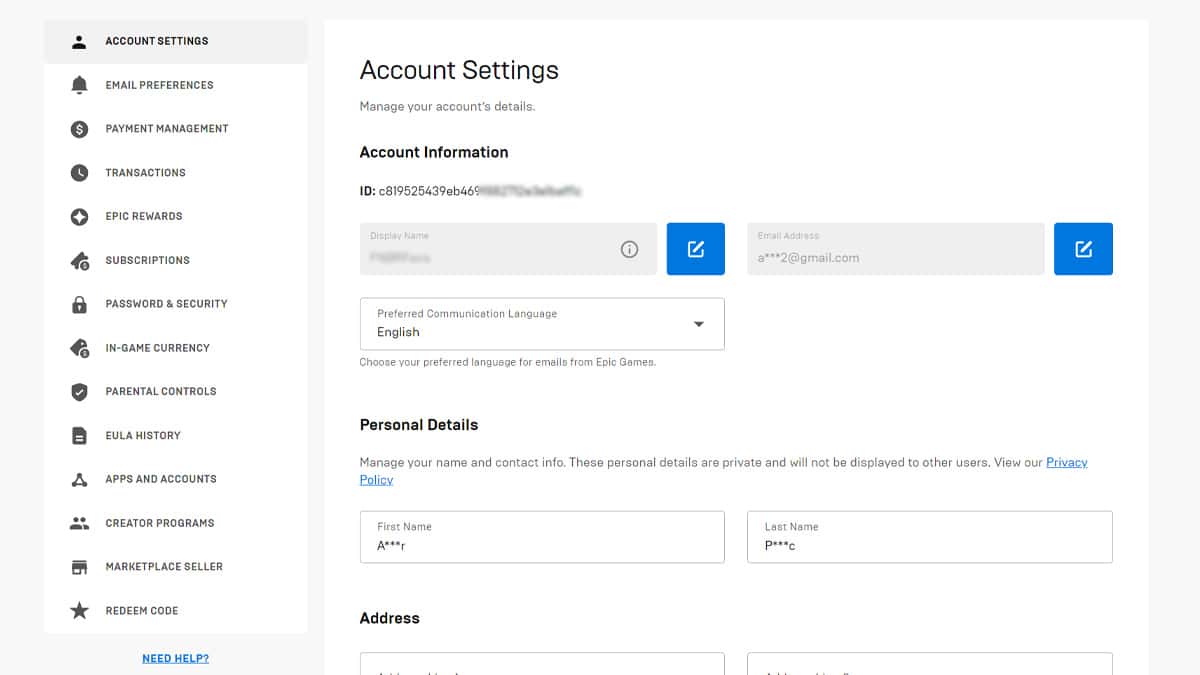
Locating your Epic Games ID on PC is straightforward through the Epic Games Launcher or their website. In the launcher, click your display name in the bottom-left corner, then "Account." Your Account ID is listed under "Personal Information." Alternatively, visit the Epic Games website, log in, go to "Account," and then "Account Info." The ID is clearly displayed there, essential for cross-play and support.
Why is My Epic Games ID Different from My Display Name?
Your Epic Games ID, also known as the Account ID, is a unique, alphanumeric string (e.g., 1a2b3c4d5e6f7g8h9i0j1k2l3m4n5o6p) assigned when you create your account. It is a permanent identifier, distinct from your Display Name, which is what friends see in-game. The ID is for system-level identification, especially for support or linking accounts, while the Display Name is for player recognition and can be changed every two weeks.
Can I Find My Epic Games ID While Playing a Game Like Fortnite?
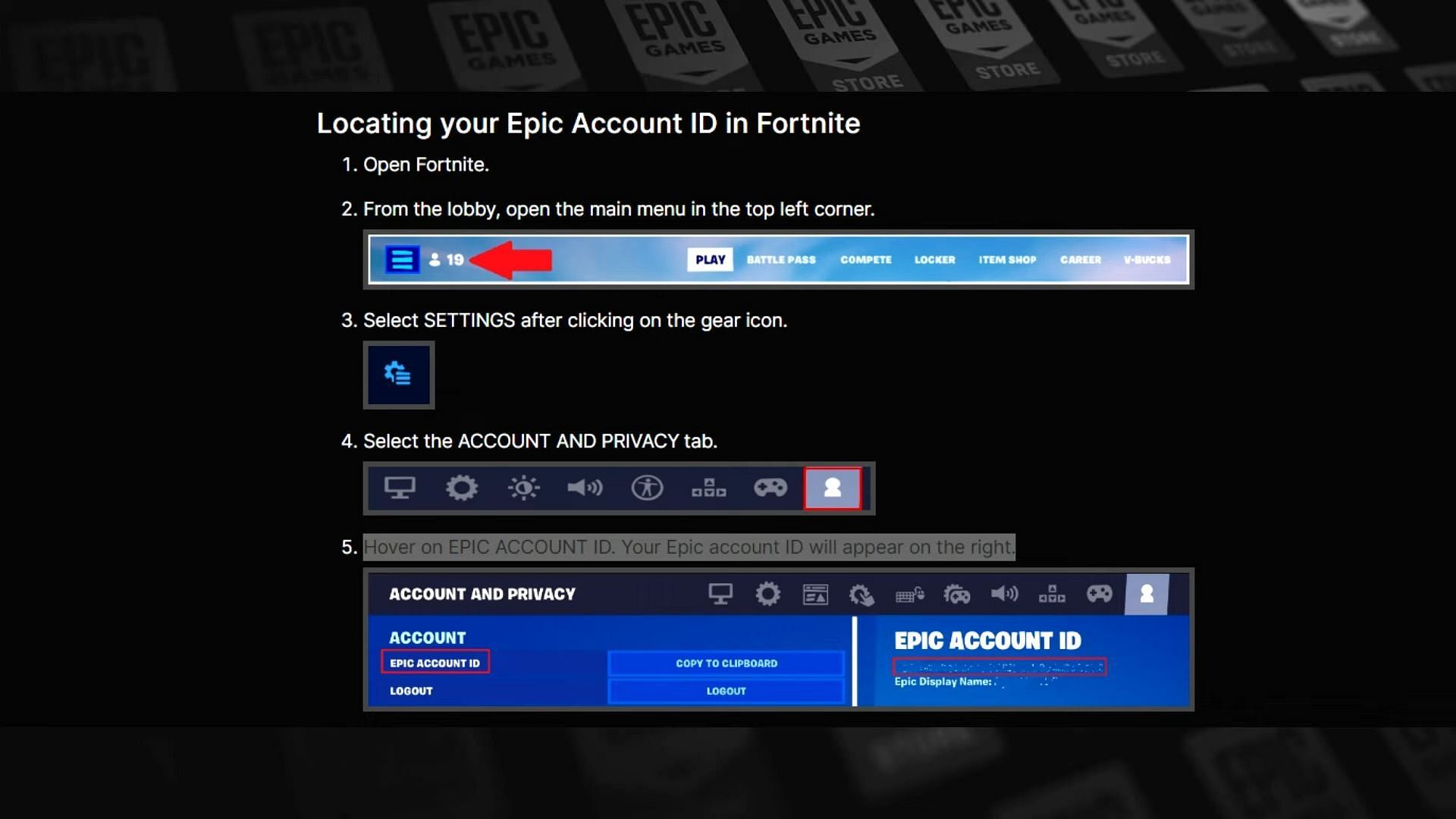
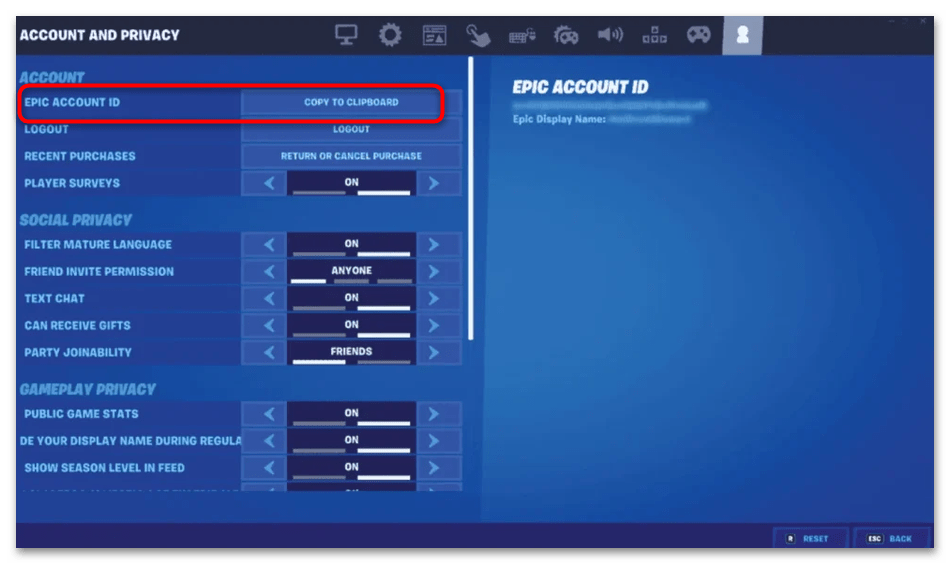
Yes, you can often find your Epic Games ID from within popular Epic titles like Fortnite. Navigate to the game's settings menu, typically under the "Account and Privacy" section. Look for an option that displays your "Epic Account ID" or a similar identifier. This method is convenient for console players or those who prefer not to leave the game environment to retrieve their ID.
What Should I Do If I Forgot My Epic Games Account Password and Need My ID?
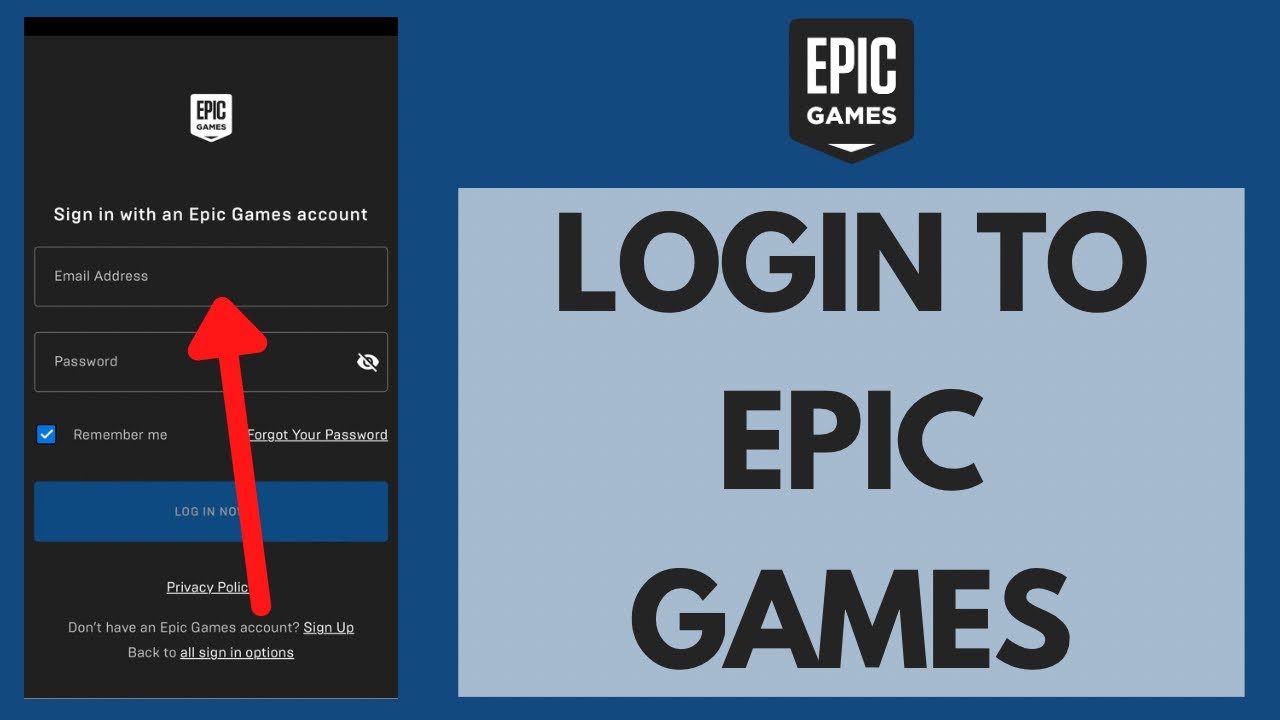
If you have forgotten your password, you cannot directly access your Epic Games ID without logging in. First, initiate a password reset through the Epic Games login page. Once you regain access, follow the steps to find your ID via the launcher or website. If you are completely locked out, you will need to contact Epic Games Support, providing any verification details you have for account recovery.
Is the Epic Games ID the Same Across All Platforms?
Yes, your Epic Games ID is a singular, unique identifier tied to your Epic Games account, regardless of the platform you are playing on. Whether you are on PC, PlayStation, Xbox, or Nintendo Switch, the underlying Epic Account ID remains the same. This consistency is crucial for cross-platform play and ensures your progress and purchases are linked to one central account.
How Often Might I Need My Epic Games ID?
You might need your Epic Games ID more often than you think, especially if you are an active gamer. It is frequently requested when contacting Epic Games Support for account issues, game troubleshooting, or refund inquiries. Additionally, it can be essential for linking your Epic account to other services, participating in competitive events, or when adding friends on different platforms if their display name is common.
Are There Security Concerns with Sharing My Epic Games ID?
While your Epic Games ID is a unique identifier, sharing it generally poses fewer direct security risks than sharing your password or email. It is mainly for identification purposes. However, it is still personal information. Avoid sharing it publicly on forums or social media, especially alongside other personal details. Only provide it to trusted sources like Epic Games Support or when directly linking accounts through official processes to prevent potential account targeting or social engineering attempts.
Ever found yourself in a gaming pickle, scratching your head trying to remember how to find epic games id? Maybe you are trying to add a friend for a cross-platform Fortnite match, or perhaps customer support asked for it, and suddenly, it feels like a digital treasure hunt. This is a common moment for many US gamers, particularly those of us balancing demanding jobs, family life, and a burning passion for gaming. We know your gaming time is precious, with 87 percent of regular US gamers dedicating over 10 hours a week to their favorite titles, blending relaxation, skill-building, and social connections. You want direct, no-nonsense solutions that get you back into the action quickly, whether that is optimizing performance or just finding that crucial piece of account info.
Navigating the digital landscape can sometimes feel more challenging than a raid boss, especially when dealing with account specifics. Understanding your unique Epic Games ID is more than just a technical detail; it is a key component for seamless social play, efficient account management, and even troubleshooting performance issues that might crop up. This comprehensive guide is designed for you, the adult gamer who values practical advice over hype. We will demystify how to find epic games id across various platforms – PC, consoles, and mobile – ensuring you spend less time searching and more time dominating the leaderboard or simply unwinding with friends. From the Epic Games Launcher to in-game settings, we will cover every method to ensure your gaming journey is as smooth and stress-free as possible. Let us dive in and equip you with the knowledge you need to stay current and connected in the ever-evolving world of gaming.
Why Is Knowing Your Epic Games ID Important for Today's Gamer?
In the dynamic world of 2026 gaming, your Epic Games ID serves as more than just an arbitrary string of characters; it's your digital passport. For the average US gamer, around 36 years old, who balances work and family, efficiency is key. Your Epic Games ID is crucial for several reasons. Firstly, it facilitates cross-platform play, a trend that has exploded with titles like Fortnite and Rocket League. When you want to add a friend playing on a different console or PC, sharing your Epic Games ID ensures you connect to the right person. Secondly, it is indispensable when dealing with Epic Games customer support. Account issues, bug reports, or even refund requests often require this unique identifier for verification, ensuring your requests are handled swiftly and accurately. Thirdly, for those who participate in competitive gaming or link their accounts to streaming platforms, the ID is often a requirement for authentication and profile management. Without it, you might hit roadblocks in expanding your social gaming circle or troubleshooting account problems effectively.
How Do I Find My Epic Games ID on PC Using the Launcher and Website?
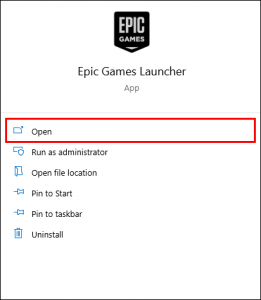
For PC gamers, locating your Epic Games ID is quite straightforward through two primary methods: the Epic Games Launcher and the official Epic Games website. Let's start with the launcher, which many of you use daily. When you open the Epic Games Launcher, look at the bottom-left corner of the window. You will see your current display name. Click on this display name. A small menu will pop up. From this menu, select "Account." This will open a new window or tab, typically directing you to your account settings on the Epic Games website. Once there, navigate to the "Account Info" or "Personal Information" section. Your unique Epic Games Account ID will be prominently displayed, usually as a long alphanumeric string. Make sure to differentiate it from your display name.
Alternatively, if you prefer using a web browser or cannot access your launcher, you can directly visit the Epic Games website. Open your preferred browser and go to epicgames.com. Log in to your account using your credentials. Once logged in, click on your profile icon or display name, which is typically located in the top-right corner of the webpage. From the dropdown menu, select "Account." Similar to the launcher method, you will be taken to your account management page. Look for the "Account Info" or "Personal Information" section. Your Epic Games ID will be clearly visible there. It is a good idea to copy and paste it somewhere safe if you anticipate needing it frequently, especially for linking accounts or talking to support.
Can I Find My Epic Games ID While Playing on a Console (PlayStation, Xbox, Switch)?
Absolutely! Console gamers, who are a significant part of the US gaming demographic and often prioritize convenience, can usually find their Epic Games ID without needing to jump onto a PC. This is particularly useful when you are mid-game and a friend asks for your ID. For popular Epic Games titles like Fortnite or Rocket League, the process is often integrated directly into the game's user interface. For example, in Fortnite, once you are in the game lobby, navigate to the main menu. Look for the "Settings" icon (often a cogwheel). Within the settings, there is typically an "Account and Privacy" or "Account Management" section. Inside this section, you should see your "Epic Account ID" displayed. This ID is universal, meaning it is the same ID that you would find on your PC or the website, confirming your unified Epic Games identity across all linked platforms. This streamlined approach caters to gamers who want to maximize their play time and minimize setup hassle.
The exact path might vary slightly between games and console generations, but the general principle remains consistent: check the account or privacy settings within the game itself. For instance, on PlayStation 5, Xbox Series X/S, or Nintendo Switch, you might need to access the game's internal settings via the pause menu. While some games might only show your display name, major Epic-owned titles are designed to provide access to your full Epic Account ID. This convenience supports the massive cross-play trend, allowing friends across different devices to connect effortlessly. Remember, your Epic Games ID is distinct from your PlayStation Network ID, Xbox Gamertag, or Nintendo Account ID, though these are linked to your Epic account. Always look for the explicit "Epic Account ID" to ensure you have the correct identifier.
What Is the Difference Between My Epic Display Name and My Account ID?
This is a common point of confusion for many gamers, but understanding the distinction is crucial. Your Epic Display Name is the name that other players see in games like Fortnite, Rocket League, or Fall Guys. It is your in-game identity, the handle you use to socialize and build your reputation. You can change your Epic Display Name every two weeks, allowing you to refresh your online persona. For instance, if your current display name is "GamerPro36" and you want to change it to "PixelPioneer," Epic Games allows this flexibility, reflecting the evolving identities of online gamers.
In contrast, your Epic Games Account ID is a unique, permanent alphanumeric string assigned to your account the moment it is created. Think of it as your account's social security number – it never changes. This ID is primarily used for internal system processes, such as identifying your account for customer support, linking your Epic account to other platforms (like Twitch or YouTube), or for backend verification when engaging in certain promotions or events. It is a sequence of letters and numbers (e.g., "a1b2c3d4e5f6g7h8i9j0k1l2m3n4n5p6") that serves as the definitive identifier for your account in Epic's database. When Epic Games Support asks for your "Epic Games ID," they are referring to this specific, unchangeable string, not your display name. Being aware of this difference prevents miscommunication and streamlines any account-related interactions.
How to Locate Your Epic Games ID on Mobile Devices (iOS/Android)?
Mobile gaming continues its dominance, especially among Gen Z and Millennials who balance quick play sessions with busy schedules. If you are primarily a mobile gamer or use your phone for account management, finding your Epic Games ID is just as simple. The most reliable method is through the official Epic Games website, which is fully optimized for mobile browsers. Open your mobile browser (Safari, Chrome, etc.) and navigate to epicgames.com. Log in to your account. The mobile site's interface will be slightly different from the desktop version, but the core navigation remains intuitive. Look for a menu icon, often represented by three horizontal lines (a "hamburger menu"), usually in the top-right or top-left corner. Tap on this menu, then select "Account." From there, you will be directed to your account management page. Similar to the desktop experience, find the "Account Info" or "Personal Information" section, and your Epic Games Account ID will be clearly listed. This method ensures that even without a PC, you have full control and access to your vital account information.
While some mobile games might offer an in-game path to view your Epic ID, relying on the official website via your mobile browser is generally the most consistent and recommended approach. This is because not all Epic-integrated mobile games might expose the full Epic Games ID directly within their in-game settings. For instance, if you are playing a game that uses Epic Online Services but isn't directly an Epic Games title, the ID might not be displayed there. Always refer to the official Epic Games account page for the most accurate and up-to-date information. This practice helps prevent setup issues and ensures you can quickly manage your account, whether you are on the go, during a work break, or unwinding after a long day.
What If I Cannot Log In to My Epic Games Account to Find My ID?
It is a frustrating scenario: you need your Epic Games ID, but you cannot even log into your account! This is a common pain point for busy gamers who might not log in every day or recently changed devices. Don't panic; there are steps you can take. Your first course of action should be to use the "Forgot Your Password?" option on the Epic Games login page. This will typically send a password reset link to the email associated with your Epic Games account. Once you regain access, you can then follow the previously mentioned steps to find your Epic Games ID via the launcher or website.
However, if you no longer have access to that email address or are encountering other login issues (e.g., two-factor authentication problems, account suspected of compromise), you will need to contact Epic Games Support directly. While they will eventually ask for your Epic Games ID, they understand that you cannot provide it if you are locked out. In such cases, be prepared to provide as much identifying information as possible: the original email address used, any linked console accounts (PlayStation Network ID, Xbox Gamertag), recent game purchases, invoice numbers, or even your previous display names. Providing detailed and accurate information will significantly speed up the account recovery process, helping you get back into your games and find your ID without unnecessary delays. Epic's support staff are well-versed in these types of issues, so clearly explaining your situation is key to a swift resolution.
Are There Any Security Concerns with Sharing My Epic Games ID?
In our increasingly connected gaming world, security is always a top concern, especially for adult gamers who have more to lose than just virtual items. When it comes to your Epic Games ID, it is important to exercise caution, but the risks are generally lower than sharing your password or email address. Your Epic Games ID is a unique identifier, and while it helps Epic Games identify your account, it does not directly grant access to it. Think of it as a public-facing serial number for your account. It is used for identification purposes, particularly by Epic Games Support or for linking your account to trusted third-party services.
However, that does not mean you should broadcast it everywhere. Avoid posting your Epic Games ID publicly on social media, open forums, or unreliable websites. While an ID alone typically cannot be used to compromise your account, combining it with other publicly available information (like your display name, linked social media, or even recent gameplay clips) could potentially make you a target for social engineering attempts or phishing scams. Always provide your Epic Games ID only when it is explicitly requested by official Epic Games channels (like their customer support) or when you are actively and knowingly linking your account through a secure, official process (e.g., linking your Epic account to Twitch for drops). Keeping your Epic Games ID private in general, even though it is not a direct login credential, is a good practice for overall online safety, allowing you to enjoy your gaming without unnecessary worry about account integrity.
How Does My Epic Games ID Influence Cross-Play and Friend Connections?
Cross-play has become a cornerstone of modern gaming, especially for US gamers who enjoy connecting with friends regardless of their platform. Your Epic Games ID is the unsung hero behind this seamless connectivity. When you want to invite a friend to a cross-platform game like Fortnite, your Epic Games ID acts as the universal connector. While you might see your friend's display name, the system internally uses their unique Epic Games ID to establish the connection. This is particularly vital when display names are not unique across the entire Epic ecosystem. For example, if multiple players have the display name "ShadowNinja," sharing the specific Epic Games ID ensures you are sending that friend request to the correct "ShadowNinja" on any platform.
This identifier ensures that your friends list, game progress, and in-game purchases are consistent and follow you across PC, PlayStation, Xbox, and Nintendo Switch. It simplifies the social aspect of gaming, allowing you to build and maintain connections without being limited by hardware choices. With mobile gaming also integrating more deeply into cross-play experiences, your Epic ID further extends your reach, enabling you to play with friends whether they are on a high-end PC or a smartphone. This unified identity ensures that the 87% of US gamers who regularly play online can easily participate in social, cooperative, and competitive play, reinforcing gaming's role as a vital social outlet in today's fast-paced world.
Can I Change My Epic Games ID, or Is It Permanent?
This is another important clarification: your Epic Games ID (the unique alphanumeric string) is permanent and cannot be changed. It is hardcoded to your account for identification purposes within Epic's systems. However, your Epic Display Name (what other players see in games) can be changed. Epic Games allows you to change your display name once every two weeks. This flexibility is great for personalizing your in-game identity or refreshing it if you grow tired of an old tag. So, while you can update your public-facing persona, the underlying unique account identifier remains constant.
If you genuinely want a different Epic Games ID, the only way to achieve this would be to create an entirely new Epic Games account. This is generally not recommended as it means losing all your existing game libraries, purchases, V-Bucks, cosmetic items, and progress associated with your original ID. For the vast majority of gamers, managing their current account with its permanent Epic Games ID and flexible display name is the best approach. Focus on keeping your display name fresh if you like, but always remember that the Epic Games ID is the steadfast anchor of your digital gaming presence with Epic.
Final Conclusion
Finding your Epic Games ID might seem like a small detail, but as we've explored, it is a crucial piece of information for any active gamer in 2026. From streamlining cross-platform social play and friend connections to ensuring smooth interactions with customer support, knowing how to quickly locate this unique identifier saves you time and prevents frustration. We've covered multiple methods across PC, consoles, and mobile, highlighting the distinction between your permanent Account ID and your flexible Display Name. By having this knowledge readily available, you are better equipped to navigate the ever-evolving gaming landscape, stay connected with your gaming community, and ensure your precious gaming moments are spent enjoying the action, not searching for account details.
Gaming remains a vital outlet for relaxation, skill-building, and social engagement for millions, and understanding these technical fundamentals contributes to a more seamless experience. So, next time you need to find epic games id, you will know exactly where to look. What is your biggest gaming challenge when it comes to account management or connecting with friends? Comment below!
Frequently Asked Questions About Epic Games IDs
Q: Can I use my console's ID (like PlayStation Network ID) instead of my Epic Games ID?
A: No, while your console account is linked to your Epic Games account, your Epic Games ID is a separate, unique identifier specifically for Epic's ecosystem. You'll need the Epic Games ID itself for Epic-specific services.
Q: What happens if someone else gets my Epic Games ID?
A: Your Epic Games ID itself doesn't grant access to your account. However, combining it with other personal information could make you a target for scams. Always keep your full account details, especially password and email, secure.
Q: Is my Epic Games ID sensitive information?
A: It is personal identification data, but less sensitive than your password. Treat it with care and only share it with official Epic Games channels or trusted services during explicit account linking processes.
Q: Does my Epic Games ID change if I change my Display Name?
A: No, your Epic Games ID is permanent and remains the same regardless of how many times you change your Epic Display Name. They are distinct identifiers.
Q: Where is the fastest place to find my Epic Games ID?
A: The fastest place is typically the Epic Games Launcher on PC (bottom-left corner, click your display name, then "Account") or by logging into epicgames.com and navigating to "Account Info."
Q: Do I need my Epic Games ID for every game from Epic?
A: While you might not actively enter your ID for every game, it is the underlying identifier that connects your progress, purchases, and friends across all games that use Epic Online Services, so it's always working behind the scenes.
Quickly locate your Epic Games ID on PC, console, or mobile. Understand why your Epic Games ID is important for cross-play and friend requests. Step-by-step guide for Epic Games Launcher, website, and in-game methods. Essential for customer support and account management. Learn the difference between display name and account ID. Resolve common pain points related to account linking and friend invites.
35



C Mo Encontrar El ID De Una Cuenta De Epic Games 3 Pasos Find An Epic Games Account Step 3 . How To Find Epic ID On Rocket League On PC Check Your Epic ID On . How To Get Your Epic Games Account ID Find Epic Games ID YouTube . Refund How To Claim Fortnite FTC Refund In The USA A Step By Step Guide 59819 1920 . How To Find Your Epic ID 3 Copy 58




Find Your Epic Games ID Its Easier Than You Think 2 Copy 57 1024x683 . Epic Games ID Kak Uznat Epic Games Id 010 . How To Find Your Epic ID 2 Copy 58 1024x685 . What Does Your Epic Account Id Do At Amanda Moretz Blog Click On SIGN IN EPIC GAMES . How To Find Your Epic Games Account ID Fortnite YouTube



How To Get Your Epic Games Account ID YouTube . How To Find Your Epic ID 1 Copy 59 261x300 . How To Find An Epic Games Account 3 Steps With Pictures Aid11529420 V4 728px Find An Epic Games Account Step 1 . How To Find Your Epic Account ID In Fortnite How To See Epic Games . What Is An Epic Account Id And Where Can I Find It At Joseph Starr Blog 3 Copy 57




Epic Games ID Kak Uznat Epic Games Id 08 462x270 . How To Find Your Epic ID For Rocket League Cross Platform Account . EPIC GAMES Login How To Login To Epic Games Account 2025 YouTube . How To Find Your Epic Games Account ID Now Full Guide 2025 YouTube . Fortnite How To Find Your Epic Games Account ID YouTube


How To Find Your Epic Games Account Email From PS4 PS5 YouTube . How To Get Find Epic Games Account ID 2025 Quick Guide YouTube . How To Find Epic ID For Rocket League YouTube . Where Can I Find My Epic Games Display Name Account Support 55fda2ff 6110 44b6 8f18. How To Find Your Epic Games Account ID In 2025 Fortnite YouTube



How To Find Epic Games ID YouTube . Where Can I Find The Recovery ID For The Recovery Process Of My Epic F8001d28 2981 41f7 Bc56. Will The Epic Games Store Free Games Program Continue 2026 Plans Revealed 912cr476 . How To Get FTC Fortnite Refund Of 245 Million VideoGamer Epic Games Id . Rocket League How To View Copy Epic Games ID Name Tutorial For



How Do I Change The Console Account I Have Linked To My Epic Games 96bf3984 5671 4861 8f88. How To Login To Epic Games Account 2024 Epic Account ID Login FULL . How To Redeem Epic Games Gift Card 2025 METHOD YouTube . Epic Games News Store Updates 2026 Epic Games Store Iphone Japan Launch Fortnite . How To Find Epic ID For Rocket League 2021 YouTube